
In this day and age, social media is a major player when it comes to driving web traffic, making it ever more important to ensure you’re setting yourself up to succeed on these platforms.
We’re all completely in control when it comes to our own posts and how they look, but what happens when someone else decides to share your site and its content? You can’t guarantee that everyone will write a perfectly optimised and attractive post that summarises and showcases your site or its content.
For example, this post is unattractive and needs improvement. The sharer obviously believes the site is relevant and of interest to their audience, but their post isn’t the least bit enticing.

Enter Open Graph. Open Graph enables any web page to become a rich object in a social graph. This basically allows you to control the way in which your site and its content is displayed on social platforms whenever an account shares a link from your site. This works for Twitter, Pinterest, Facebook, LinkedIn and Google+.
By utilising Open Graph you have the chance to make your posts attractive, engaging and eye-catching. You can take advantage of imagery and a blurb to entice users to click through and read more. Here’s a good example of an optimised post:

Few users take full advantage of Open Graph and don’t spend the time optimising these tags. Business can potentially see a drastic increase in click-through rates by effectively optimising their tags to show the content in its best light when your URLs are shared.
Adding Open Graph tags to your site
In order to add Open Graph to your website you first need to include meta tags in the <head> part of your websites code. This is where you include the information that you want to show when your link is shared on social.
Each page requires these four properties:
og:title - The title that you’d like to appear within the graph.
og:image - An image URL that represents your content within the graph.
og:type - The type, such as a recipe or article (find the full list here). Other properties may be required with various types.
og:url - The URL of your page or post. Only the domain will be visible on social, however, it’ll still function as desired.
It’s also important to add a description to your meta tags. This tag is optional however it allows social media to tell your audience a bit more about the page and its content. A well-written and optimised description will most definitely boost click-through rates.
Here’s a great example of Open Graph code by The Daily Mash.
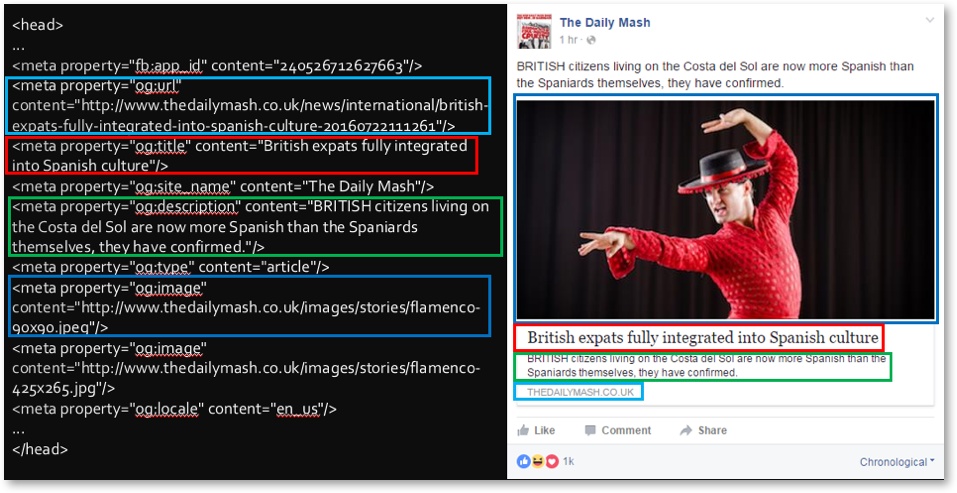
Easily utilising Open Graph
Writing code isn’t for everyone, and sometimes it’s not even possible to access your site's <head> code. In these situations, a plugin can be installed that will gladly do all the leg work for you.
There’s a number of these useful plugins, add-ons and extensions for WordPress, Drupal, Magento, Zen Cart and many other CMS’.
Next Gen Facebook Pro for WordPress is a really simple one to use. Firstly you set the article topic and type in the titles and descriptions for all the networks that the plugin works with. Next, you select the desired images which should be sized and optimised to work across all social platforms. Most plugins will generate a preview of what a post including your link will now look like on social platforms.
Before anything is shared to social media, it’s wise to check your tags using Open Graph validators. Some plugins will let you do so within the tool.
This will allow you to preview the post and highlight mistakes along with providing suggestions for your tags.
Twitter cards
Twitter Cards allow the user to add videos, photos and other media to tweets in the same way that Open Graph does for Facebook. However, this does require a bit of extra code.
The five basic components you need are:
- twitter:card (specify what the content is)
- twitter:title
- twitter:description
- twitter:url
- twitter:image
Although it’s dependent on your content, Pinterest supports Open Graph and many other formats for marking your pages. Much like Twitter and Facebook, you’ll need to add meta tags to your site, test out the rich pins and then apply for approval from Pinterest to get your rich pins up and working. This can be extremely tough to get done, so it may be a good idea to seek the assistance of a developer to set up these rich pins.
The functions described above are just the tip of the iceberg when it comes to the interesting things you can use Open Graph for. There’s far more technical and advanced tags out there along with more complex advanced integrations with Facebook.
New and exciting features from Twitter and Pinterest such as buyable pins and lead generation cards are making Open Graph an ever more powerful and important tool to promote your business through social media, so it’s definitely work jumping on board and making some changes.
By Gina Hutchings, SEO account manager at Receptional
Want to keep up with the latest ideas in digital marketing? Free conference and exhibition Integrated Live is the place to be.
PrivSec Conferences will bring together leading speakers and experts from privacy and security to deliver compelling content via solo presentations, panel discussions, debates, roundtables and workshops.
For more information on upcoming events, visit the website.
comments powered by Disqus