
Google answer boxes are becoming increasingly prominent in organic search results. Google itself makes no secret of its desire to improve the experience for its users, and it sees Answer Boxes, which deliver the answer to key questions within the results page, as a way to achieve this.
It’s a development that has got a mixed reaction from some SEO specialists, particularly due to the potential for lower click-through-rates, but it is also a way for brands to secure extremely prominent and visible search real estate.
However, it’s an area that not everybody is getting right. So how can you ensure that you are making the most of this opportunity?
How not to optimise for Google Quick Answer Box
The whole purpose of the Google Quick Answer Box is to deliver the answer to straightforward queries in a quick, easy-to-digest format. So large paragraphs of text with very little context don’t really work.

In this example, we find an answer box result for the query “how to lay paving” and, whilst the information itself may be sound, the information itself isn’t presented in a way which is easy to digest, especially for the lay-person. It doesn’t address the query in full (although this may be difficult to do for this query) and it appears to miss steps. For example, we don’t know what “the mix” is in this instance.
Optimise your content
This result for “how to wire a plug” is much better.

This result has clear, step-by-step instructions, it features a diagram and it includes all the necessary steps within the answer box, meaning that the user doesn’t have to click-through to get the answer to their query – great for users of mobile devices in particular.
Identifying when a page isn’t optimised for Answer Box
Answer Box results provide some prime Google real estate and, as a result, have become a key SEO battleground for commercial search terms. So it is important that digital marketers ensure that key pages are optimised to serve Answer Box results.
There are a number of reasons why Answer Box results may not display correctly, and the result below is just one example.
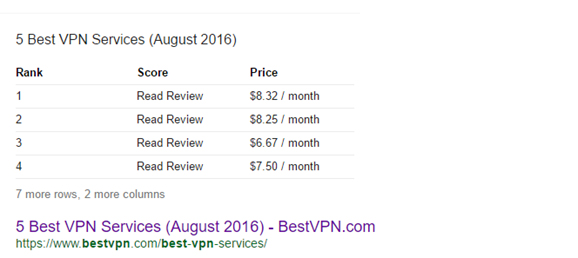
Here, we have a comparison table for VPN providers, but we can see a clear problem with the data that is being pulled through. The provider name is now displaying, and the score isn’t visible; the field simply displays “Read Review” with no link to the review.
The data actually pulls in from the following table, and we can see that much of the key information is actually image-based.
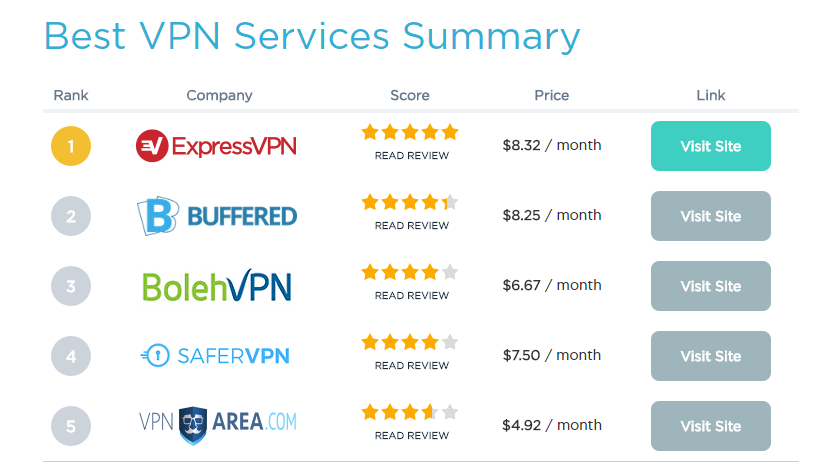
It suggests that Google isn’t able to pull through the alt text for either the logo or scores from this table, so this is a clear area for optimisation.
Fixing the problem
We looked at how this issue could be rectified, and looked at ways in which the correct data could be pulled into the answer box whilst still retaining the visual elements of the comparison table.
One way to achieve this was to use the <span> tags behind both the company logo & score image to provide the company name & actual rating score, and we were able to successfully ensure that the company name was displayed correctly.
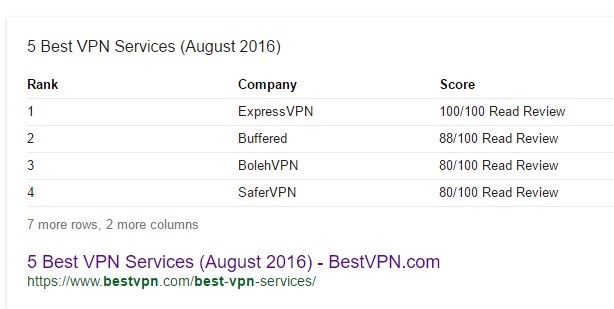
Google continued to pull through “read review” alongside score due to both being text within the same cell, so we also made the “read review” text an image. This still works from a user perspective and stopped Google using the “read review” text within the answer box result.
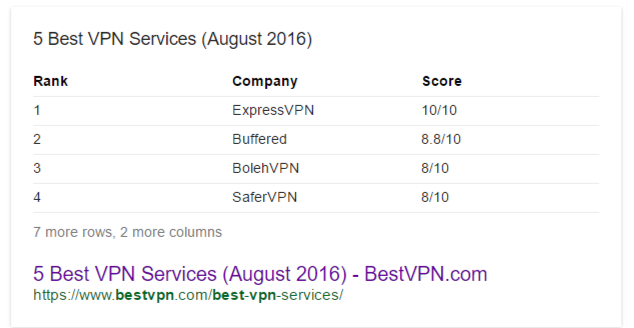
Google Answer Box is a prime area of search engine real estate, but it is clear that the results themselves have the potential to be flawed. As well as ensuring that the information is correctly pulled through from a technical perspective, there is also an onus on ensuring that the content that is pulled through delivers the correct user experience. As we can see from the plug-wiring example earlier, a well-presented Answer Box result has the potential to be extremely useful to the end user.
What is striking is how quickly Google is prepared to change its Answer Box results. We managed to have the Best VPN answer box result updated within seconds by submitting the URL within Search Console.
With ‘question and answer’ searches now a key area for Google to from a user perspective, it is vitally important that brands structure both their websites and content to cater to this search traffic. This is a development that Google is likely to keep developing, and users will continue to use contextual search terms such as “how to” and “compare”, so it is prudent to ensure that your content strategy reflects the questions that your customers are likely to be asking.
By Ryan Saltmer, SEO lead at Stickyeyes
PrivSec Conferences will bring together leading speakers and experts from privacy and security to deliver compelling content via solo presentations, panel discussions, debates, roundtables and workshops.
For more information on upcoming events, visit the website.
comments powered by Disqus